
05.1
Ask naturally
Use the language of the work instead of hunting for the right screen, record, or report.
Ask. Prioritize. Automate. Measure. Launch.
Navigator, Shift Coach, Architect, Reports, and Templates share one operating model for conversational work, proactive guidance, automation, measurement, and faster launches.
Navigator gives the technician or operator logged into Stravere a conversational way to work with the PSA. Ask for the information you need, review dynamic data in the chat, and request changes without navigating through modules and tabs.
Questions, data, and changes stay in one working context, reducing the clicks between finding information and acting on it.
Use the language of the work instead of hunting for the right screen, record, or report.
Review the supporting PSA data in the conversation so the answer remains connected to the question.
Request a PSA change in the same working context instead of starting over in another module or tab.
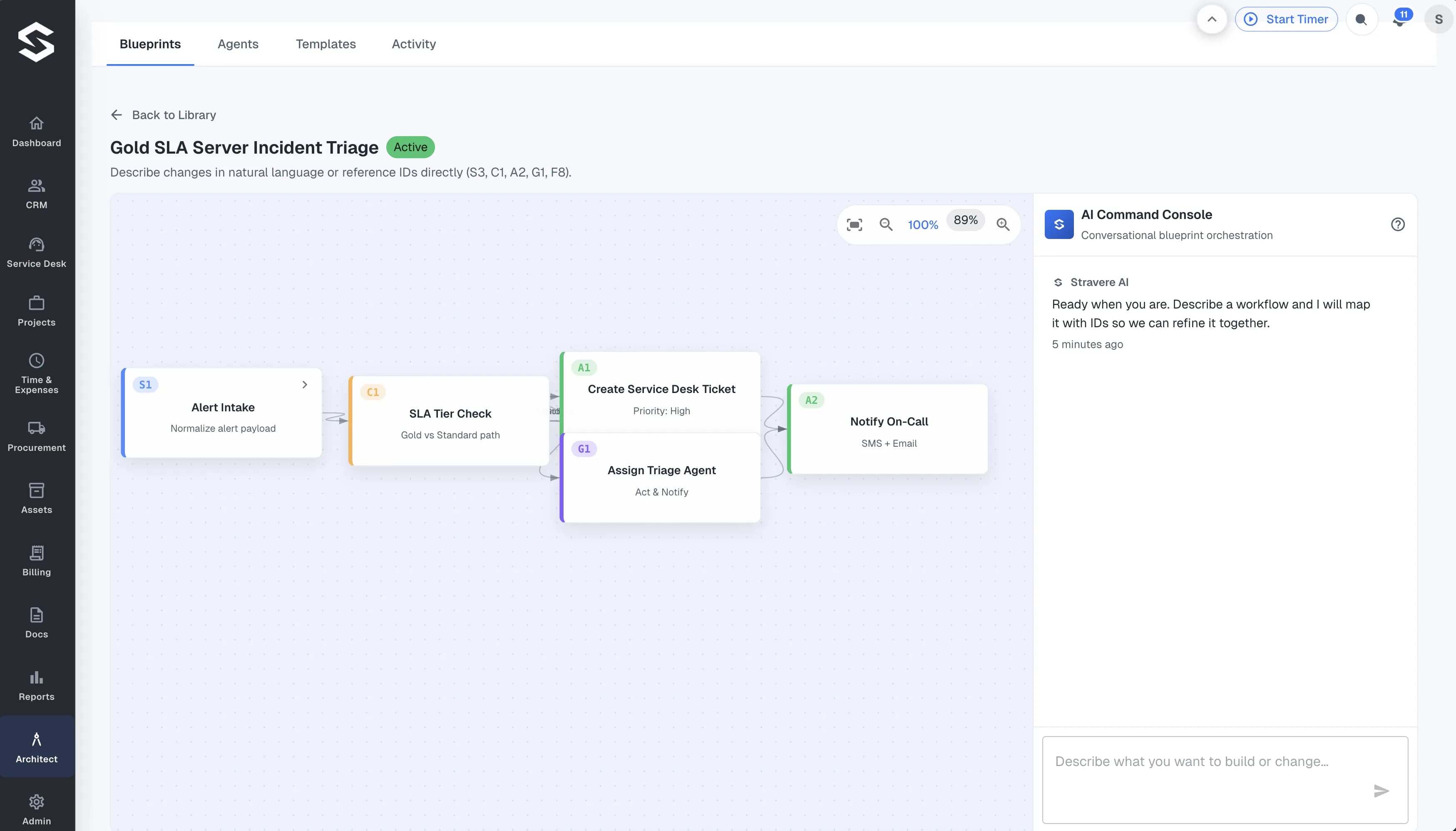
Architect is where intelligent automation becomes reality. It's a purpose-built canvas for designing, deploying, and scaling AI-powered workflows across every corner of your MSP operations — without asking your operators to write code, configure integrations by hand, or stitch tools together manually.
Model complete end-to-end automations. Encode client SLAs, priority tiers, and business rules into defined logic. See each branch, trigger, and handoff so your team can understand what the AI workflow is doing.
Model automations across lead capture, service delivery, billing, and procurement in a single canvas with defined handoffs and configured triggers.
Encode client priority, SLA expectations, and business rules into AI-driven decision branches before work goes live, keeping automation governed by defined and reviewable logic.
Configured triggers, branches, and handoffs are visible in the Architect interface. Teams can review what automation ran, when, and why so they can improve it over time.
Never push a workflow live and hope for the best. Never wait until end-of-month to find out a contract is underwater. Stravere's evaluation and reporting tools let your team interrogate connected operational data with plain-English questions, compare outcomes over time, and automate recurring report delivery.
Reports is built around the same operational data model used by Shift Coach and Architect, keeping reporting and AI recommendations connected to shared platform context.
Interrogate operational data directly with the same questions your team asks every day. Type the question and review the answer in Stravere.
Compare margins, utilization, and SLA risk across billing periods so that changes in performance are measurable, not just observable.
Schedule recurring reports to the right stakeholders — owner, ops lead, account manager — without manual follow-up or end-of-month scrambles.
The AI Shift Coach brings forward operational signals across billing, time entries, agreements, and procurement, helping each operator focus on work with the greatest urgency and business impact.
It is designed as an active working surface rather than a passive notification center, keeping the supporting signals close to the action an operator may take next.
Bring work into focus using business impact and SLA pressure so operators can make a more informed decision about what to do next.
Combine signals from Time & Expenses, Billing, and Procurement into one operator-ready decision surface. No more toggling between modules to piece together the picture.
Shift Coach uses the connected operational context that also supports Architect, Reports, and the rest of Stravere.
Your first automation should not require starting from a blank canvas. Architect Templates gives your team MSP-ready workflow patterns with room to extend them for the way your operation works.
Choose a starting pattern, adapt it through AI conversation, and move from an idea toward a defined automation with more of the structure already in place.
Start from patterns designed around MSP workflows instead of rebuilding the same process structure from scratch.
Adapt any template to your specific clients, agreements, and rules through AI conversation inside Architect — without rebuilding from scratch every time your requirements change.
In-product guides, complexity ratings, and onboarding resources support your team at every step — so building automation capability becomes part of how your MSP grows, not a one-time project.
Explore conversational work, prioritization, automation, reporting, and reusable MSP workflow patterns in one platform walkthrough.